Model Librarian
Support on Ko-fi Get the suite
Note

Every model in its place.

Model Librarian finds what a ComfyUI workflow is missing, downloads it into the right folder, and keeps your library in order. Free and open source.

comfy node install comfyui-model-librarian
  • Model Librarian in ComfyUI
  • Model Librarian for Chrome on CivitAI
  • Model Librarian Gallery on Windows
Load CheckpointMissing
MODEL CLIP VAE
ckpt_namelumen_xl_v3.safetensors
LoRA LoaderMissing
model
MODEL
lora_nameharbor_lights.safetensors
strength0.80
KSampler
model
LATENT
seed1390851129
steps · cfg8 · 1.0
VAE Decode
samples vae
IMAGE
Save Image
images
Waiting for its modelsThe sample picture this workflow makes: pale mountains under a full moon.
Model Librarian · Workflow2 missing
Missinglumen_xl_v3.safetensors0 of 6.46 GB civitaiCheckpointLoaderSimple → checkpoints
Missingharbor_lights.safetensors0 of 218 MB civitaiLoraLoader → loras
Both found on CivitAI, SHA256 checked on arrival. MODEL

Sample workflow. The models and picture are the sample data from the README screenshots.

Model Librarian · Workflow tabComfyUI
model
MODEL
The Workflow tab listing two missing models with their CivitAI sources, one moved model, and two that are fine.

Missing models, found and fetched

Open anyone's workflow and Model Librarian lists every model it can't find, with a source for each. Downloads land in the right folder, checked against their SHA256, and pick up where they stopped.

  • Looks in the workflow's own links, ComfyUI's templates, HuggingFace, CivitAI and CivArchive.
  • All saved workflows checked at once, and moved models repointed.
  • Share a workflow with every model's download link built in.
CivitAI · Model Librarian for ChromeChrome and Edge
model
MODEL
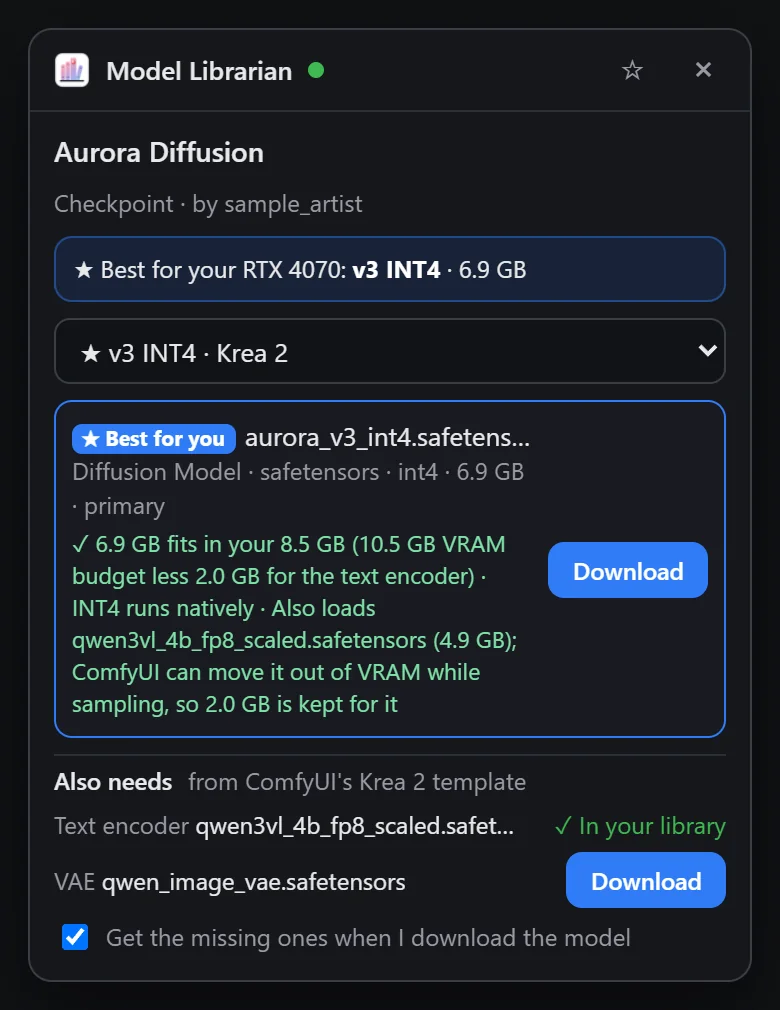
The extension's panel on a CivitAI model page: the best file for an RTX 4070, with the text encoder and VAE it also needs.

One click on CivitAI

The browser extension puts a panel on every CivitAI model page. It picks the file that fits your GPU and VRAM, adds the text encoder and VAE it needs, and hands the download to Model Librarian.

  • Have and Update badges on CivitAI's model cards.
  • Every model a CivitAI image used, saved as a recipe in one click.
  • ComfyUI can be closed: clicks wait and start when it's back.

Not on the Chrome Web Store or Edge Add-ons yet. Until then it installs with Load unpacked (see Install).

Model Librarian · LibraryComfyUI
model
LIBRARY
The Library: LoRAs with previews, filtered by folder, source and base model, with Illustrious, Pony, Flux, Qwen and Wan badges.

Sorted by base model

Your models in one gallery with CivitAI previews, trigger words and base-model badges. The organizer files them into Illustrious, Pony, Flux and the rest, and repoints your saved workflows to match.

  • Update alerts for newer CivitAI versions, compared before you download.
  • Models taken down from CivitAI are flagged, since yours may be the last copy.
  • Duplicates under any name, and downloads that never finished.
Model Librarian · StorageComfyUI
library
LIBRARY
The Storage tab suggesting unused models to move to an archive drive, with a free-space goal for the SSD.

The SSD keeps what you use

Models you haven't touched in a while move to an archive drive and keep working under the same names. The moment a workflow needs one again, it comes back to the SSD.

  • Set a free-space goal; the least recently used models are suggested first.
  • Every ComfyUI on the same models folder shares one library.
Load Image · RecipeComfyUI
library
IMAGE

Any image becomes a recipe

Drop in an image or a ComfyUI video, or paste a CivitAI link. You get its prompt, settings, checkpoint and every LoRA with its strength, then download what you're missing and load it into the workflow.

  • Reads ComfyUI, A1111 and Forge, CivitAI, Fooocus, InvokeAI, SwarmUI and NovelAI images.
  • Save what made your own image as a recipe after a run.
Gallery Info (Model Librarian)
images
IMAGE
albumsCoastline
tagspaper cut style
rating
folder{project}/{character}/{date}/

Every picture remembers what made it

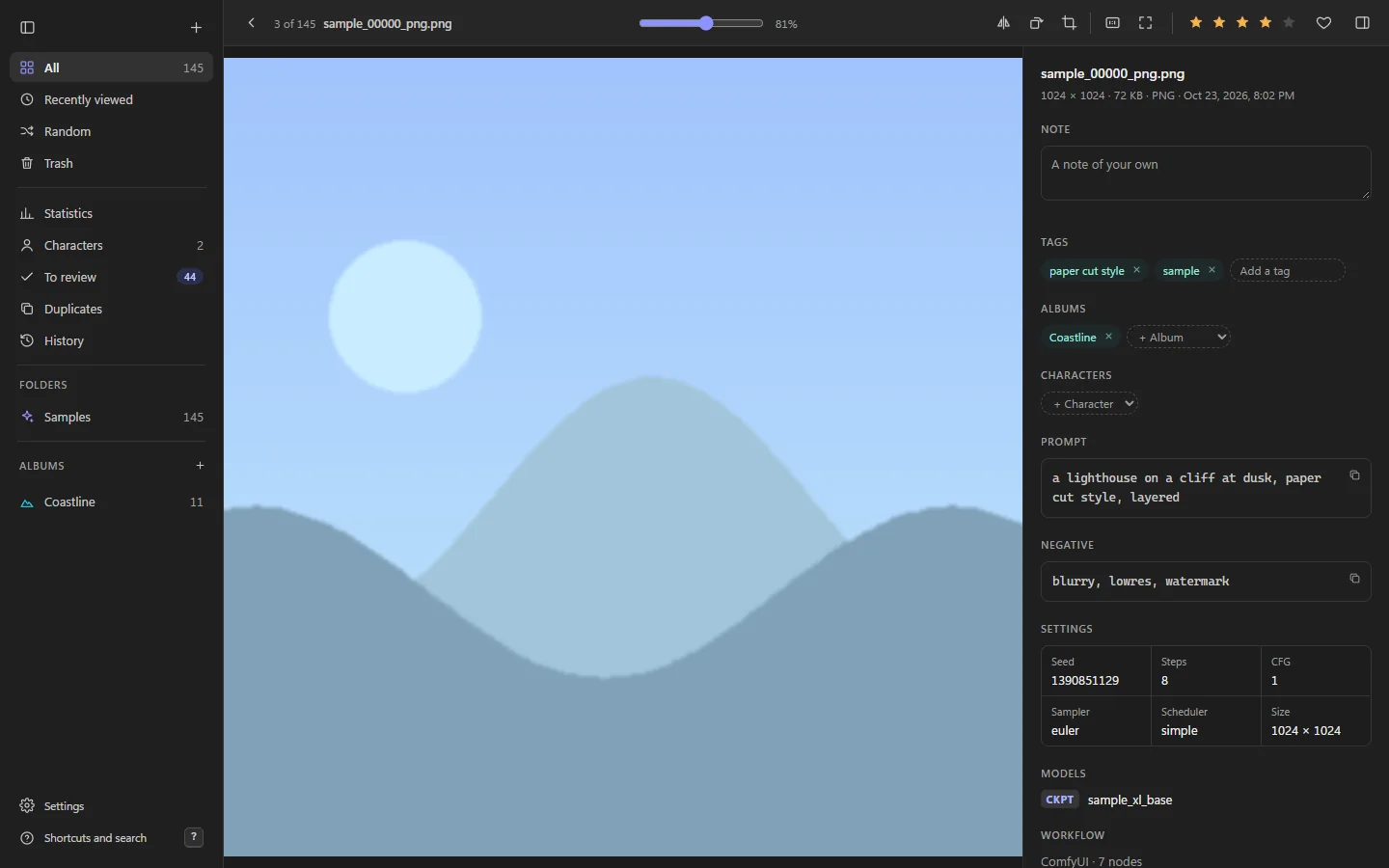
Model Librarian Gallery is a fast Windows app for your AI generations, photos and illustrations. It reads the prompt, settings, models and workflow saved in each file, and the Gallery Info node files new images as they're made.

  • Search with lora:, model:, character: and more; statistics on what you make with.
  • Open in ComfyUI sends any picture's workflow back to a new tab.
  • Indexes your folders where they are. Nothing is copied, and nothing leaves your PC.

Install

Each part works on its own; together they hand work to each other. Start with Model Librarian in ComfyUI.

Model LibrarianComfyUI custom nodes · v1.23
comfy node install comfyui-model-librarian
  1. Or search Model Librarian in ComfyUI-Manager.
  2. Restart ComfyUI and open Library in the toolbar.
  3. Add your CivitAI API key in Settings for CivitAI downloads.
Model Librarian for ChromeChrome and Edge extension · v0.6.1
  1. Download the repository as a ZIP and unzip it.
  2. Open chrome://extensions (or edge://extensions) and turn on Developer mode.
  3. Choose Load unpacked and pick the folder with manifest.json.

Needs Model Librarian 1.15 or newer. Store listings are on the way.

Model Librarian GalleryWindows app · portable
  1. Download the portable ZIP from the latest release.
  2. Unzip it outside OneDrive, for example into %LOCALAPPDATA%\Programs.
  3. Start Model Librarian Gallery.exe. It isn't signed yet, so Windows SmartScreen may ask first: choose More info, then Run anyway.